
We know how it feels to sink hours upon hours into getting as much experience on new characters and unlocking more content, only to wake up the next day and find out your save files got corrupted.
For players who are facing this annoying save file issue or if you simply wish to save-scum a bad boss fight… we are not judging, we have prepared this quick guide to tell you where to find the Slay the Spire 2 PC save file location.
PC Save File Location
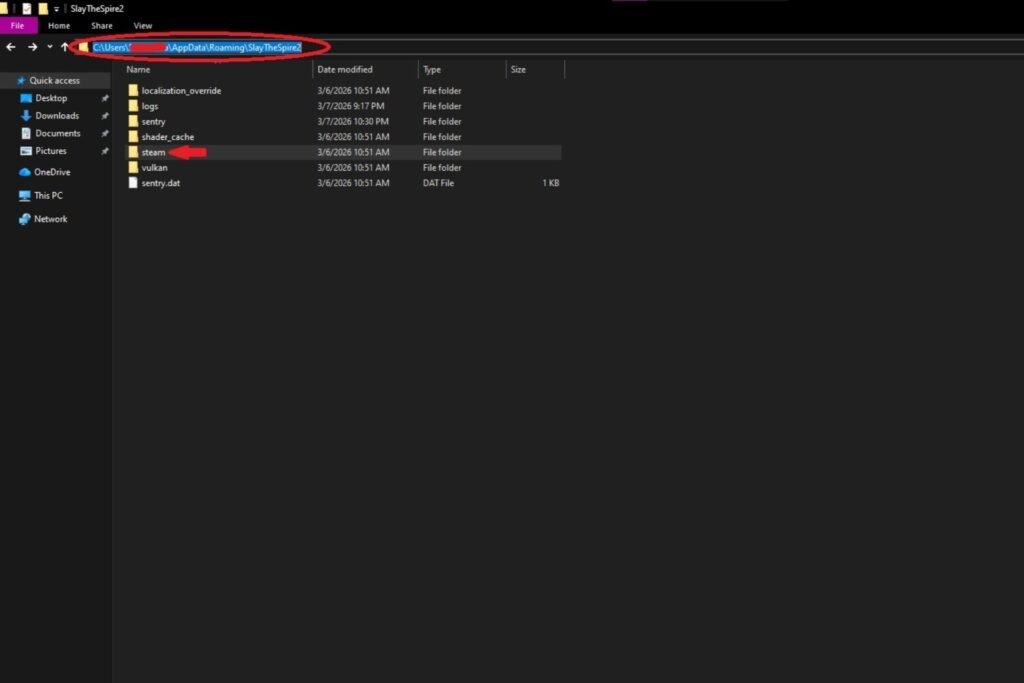
On a Windows PC, you should be able to find the save file in the following path. Just add your username in the “username” section.
C:\Users\username\AppData\Roaming\SlayTheSpire2\steam
If you pirated the game, the location will be different. In which case, the path would be one of the two mentioned below.
C:\Users\yourusername\AppData\Roaming\GSE Saves\2868840\remote
C:\Users\Public\Documents\Steam\RUNE\2868840\remote
Be Cautious with Save Files

Save files are essentially your hours of hard work. So, before you do anything with them, we highly recommend creating a backup in case something goes wrong.
If Steam detects an inconsistency or anything wrong with the save file you just put in your folder, it can very easily delete it and save a fresh new save in its place. Be careful out there, gamers!

Slay the Spire 2 has entered early access, and it’s already breaking records. Even though there is a lot to experience in the game, the devs are planning to polish it further.
If you just started the game and wish to learn the new characters in Slay the Spire 2, be sure to check out our complete Regent guide. More guides will be added soon, so be on the lookout!